Home › Services › Bank statements
Bank statements to Excel, sorted and checked
Send us your bank statements in any format: PDFs, scans, photos, or your bank’s Excel or CSV download. You get back an Excel workbook with every transaction sorted into a category, and every figure checked against your statements before it reaches you.
How we check every workbook
Every bank order goes through up to 50 accuracy checks before the workbook reaches you. Among them:
- Every transaction is matched to a line on your statement: same date, same amount, same words.
- Each statement’s balances roll forward and agree with the bank’s own printed totals.
- Every business is looked up. A payment we can’t place is asked about, never guessed.
See the checks in detail in our guide, How to check an AI-built bank statement spreadsheet.
What people use it for
- Catching up a client’s books. A year of statements, sorted into categories you can post from.
- Loan and underwriting files. Cash flow by category and a monthly average, with each statement’s balances rolled forward.
- Tax time. Spending grouped by kind, with every line traceable to the statement it came from.
- Seeing where a business’s money goes. The biggest categories first, with totals.
What your current tools leave to you
Accounting software suggests categories, and converters turn a PDF into rows. Checking the result is still your job. Here’s what we do differently:
- No books needed. We start from your statements, not from accounting software connected to your bank.
- Businesses looked up, not guessed. Most tools guess a category from the words on the line. We look up who the business actually is.
- Questions answered in one tap. “Fuel or groceries?” The answer files the payment.
What’s in the workbook
Six tabs, in the order you read them:
| Tab | What it shows |
|---|---|
| Extraction | Every transaction, statement by statement, with its date, description, business name, category and amount. |
| Statement Summary | One line per statement: beginning balance, money in, money out and ending balance, next to the ending balance your bank printed. |
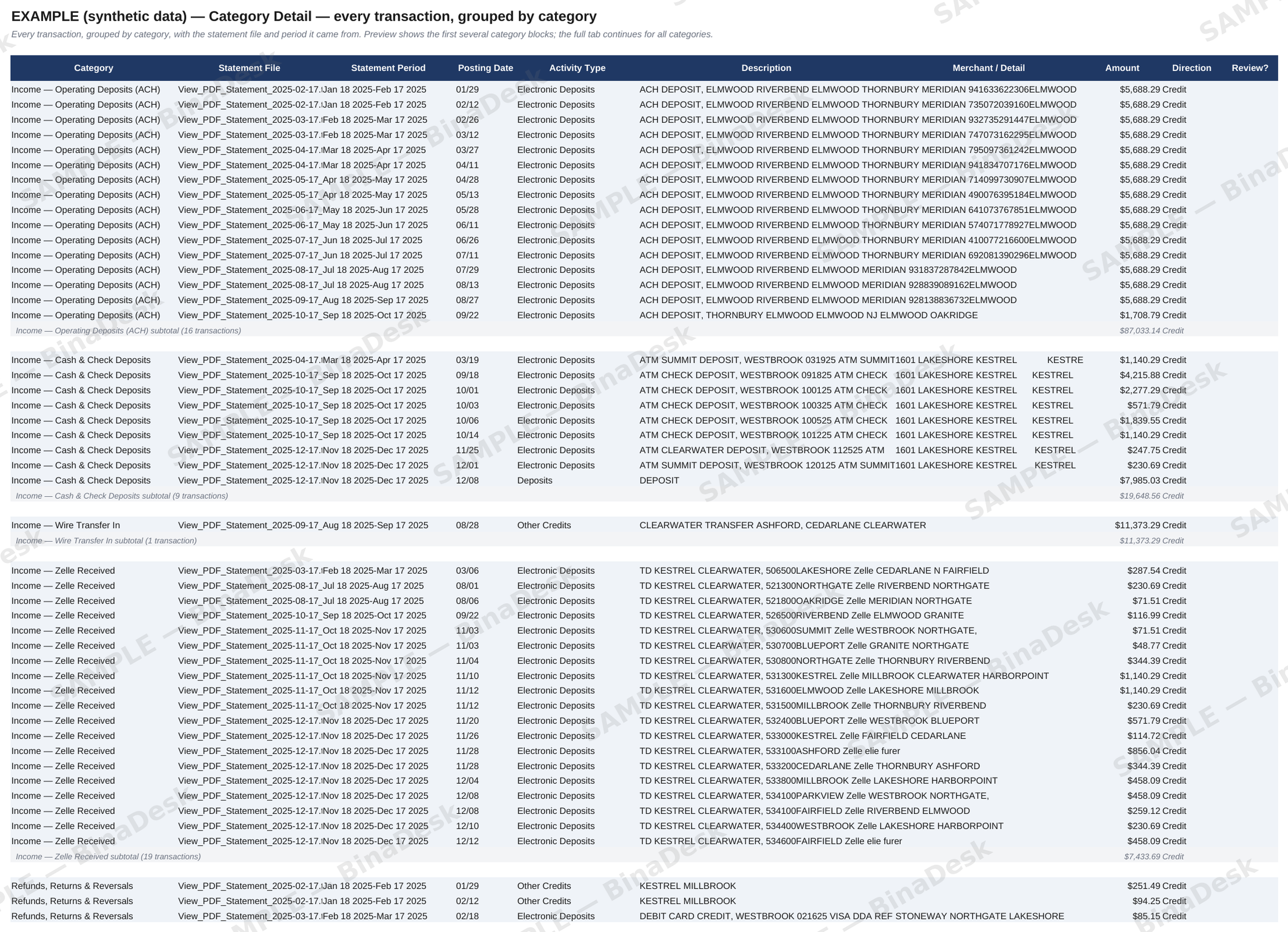
| Category Detail | The same transactions grouped by category, each category with its own subtotal. Money in first, then money out, largest first. |
| Category Summary | Each category’s count, total, share and monthly average for the whole period. |
| Reversed Payments | Each bounced or returned payment right above the reversal that cancelled it, so they don’t inflate your income or spending. |
| Review Queue | Anything that needs your answer, and large payments worth a second look. |
Totals are Excel formulas, so they update if you move a transaction to another category.
Getting a clean result
- Download your statements from online banking as PDFs. They read better than scans or photos.
- Send every page, including the summary page. Its printed totals are part of what we check against.
- Send every month in the period. A missing month shows up as a gap in the balances.
Make it yours
After delivery, write in your portal what you want changed, in plain words. Move payments to another category, rename a category, or ask for different colors. Your workbooks follow your choice. Questions we couldn’t settle can be answered now or later; until then they wait in the Review Queue tab.
Every figure is checked against your statements before the workbook reaches you (how we check). Price, turnaround, how long we keep your files and what counts as an error are in our FAQ.
Questions
Can I send scanned statements?
Yes, if they can be read. A PDF downloaded from online banking is best. If a page is too hard to read to add up, we ask you for a clearer copy.
Can I send an Excel or CSV download from my bank?
Yes. We read any download from online banking that has the dates and amounts of your transactions. If one doesn’t, we tell you what to send instead.
Can I send several accounts in one order?
Yes. Several accounts and several months can go in one order. Every transaction is tagged with the statement it came from, and each statement gets its own line on the Statement Summary tab.
What if I don’t know what a payment was for either?
Choose Answer later. You get your workbook now, and the open questions wait in its Review Queue tab until you answer them in your portal.
Can I change a category or its name?
Yes. Write what you want in your portal in plain words, such as moving some payments to another category or calling Postage “Postage and Shipping”. Your workbooks use your choice.
Is it useful for a loan file?
It gives you cash flow by category, a monthly average, and each statement’s balances rolled forward. It isn’t an audit or a credit decision.